Daily Loss Limit Protection for Prop Firm Accounts
Automatically stop trading when you hit your maximum daily loss. Like a bartender cutting you off before things get ugly.
What Are Daily Loss Limits?
A daily loss limit is the maximum dollar amount an account can lose in a single trading day. When the limit is reached, TradingPlace automatically stops sending new trades to that account for the rest of the day.
Tilt Prevention
Bad days happen. The worst thing you can do is revenge trade after a string of losses. Daily limits enforce discipline when emotions run high.
Bad days happen. The worst thing you can do is revenge trade after a string of losses. Daily limits enforce discipline when emotions run high.
Required Before Trading
New accounts start with no daily loss limit configured. All trading (both manual and automated) is blocked until you set a DLL greater than $0. This ensures every account has proper risk protection before any trades execute.
New accounts start with no daily loss limit configured. All trading (both manual and automated) is blocked until you set a DLL greater than $0. This ensures every account has proper risk protection before any trades execute.
How It Works
TradingPlace tracks your realized P&L throughout the trading day:
- Each closed trade updates your daily P&L
- When daily loss exceeds your limit, the account is "locked"
- Locked accounts are skipped for all new trades
- Existing positions remain open (you can still manage them)
- The lock resets at 6pm ET when the new trading day begins
Configuring Limits
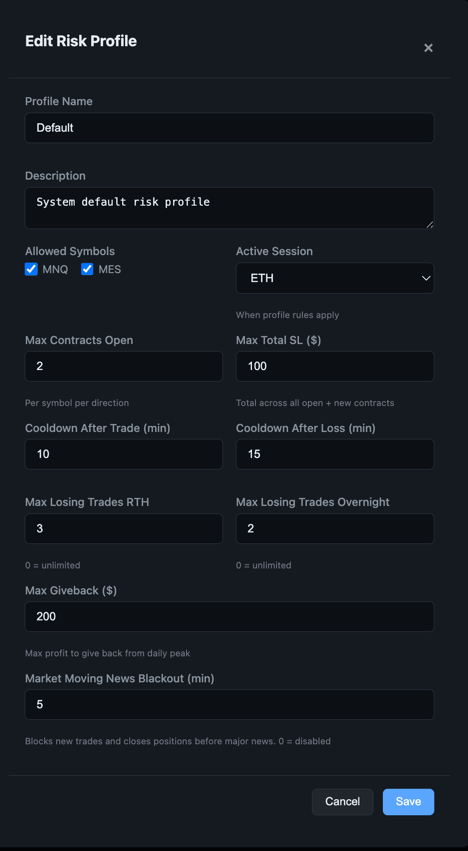
Set daily loss limits per account in your dashboard:
- Go to Account Settings
- Click the account you want to configure
- Set the Daily Loss Limit in dollars
- Click Save
Prop Firm Tip
Set your daily limit well below the prop firm's max daily drawdown. If they allow $2,000 daily loss, set yours to $1,500. This gives you a buffer for slippage and open P&L.
Set your daily limit well below the prop firm's max daily drawdown. If they allow $2,000 daily loss, set yours to $1,500. This gives you a buffer for slippage and open P&L.
What Happens When Limit Is Hit
When an account hits its daily loss limit:
- The account card turns red and shows "Daily Limit Reached"
- New trades skip this account automatically
- You can still close existing positions manually
- Other accounts continue trading normally
- The limit resets at 6pm ET
Best Practices
- Be conservative - Set limits that feel slightly uncomfortable. You'll thank yourself later.
- Account for fees - Include commission and exchange fees in your mental math.
- Don't override - Resist the urge to raise your limit mid-day. That's tilt talking.
- Review weekly - If you're hitting limits frequently, your position sizing may be too aggressive.