MKT
SHORT MKT
LONG
SHORT MKT
LONG
Entry
Market long and short buttons submit through the TradingPlace account selection already visible in the portal.
Map physical Stream Deck keys to TradingPlace trading actions so selected-account entry, risk controls, and open-trade management are always under your fingers.
TradeMonkey mirrors TradingPlace account selection and open-trade state onto Stream Deck buttons. The keys stay scoped to the accounts selected in the portal, so the hardware follows the same account intent as your chart and cockpit.
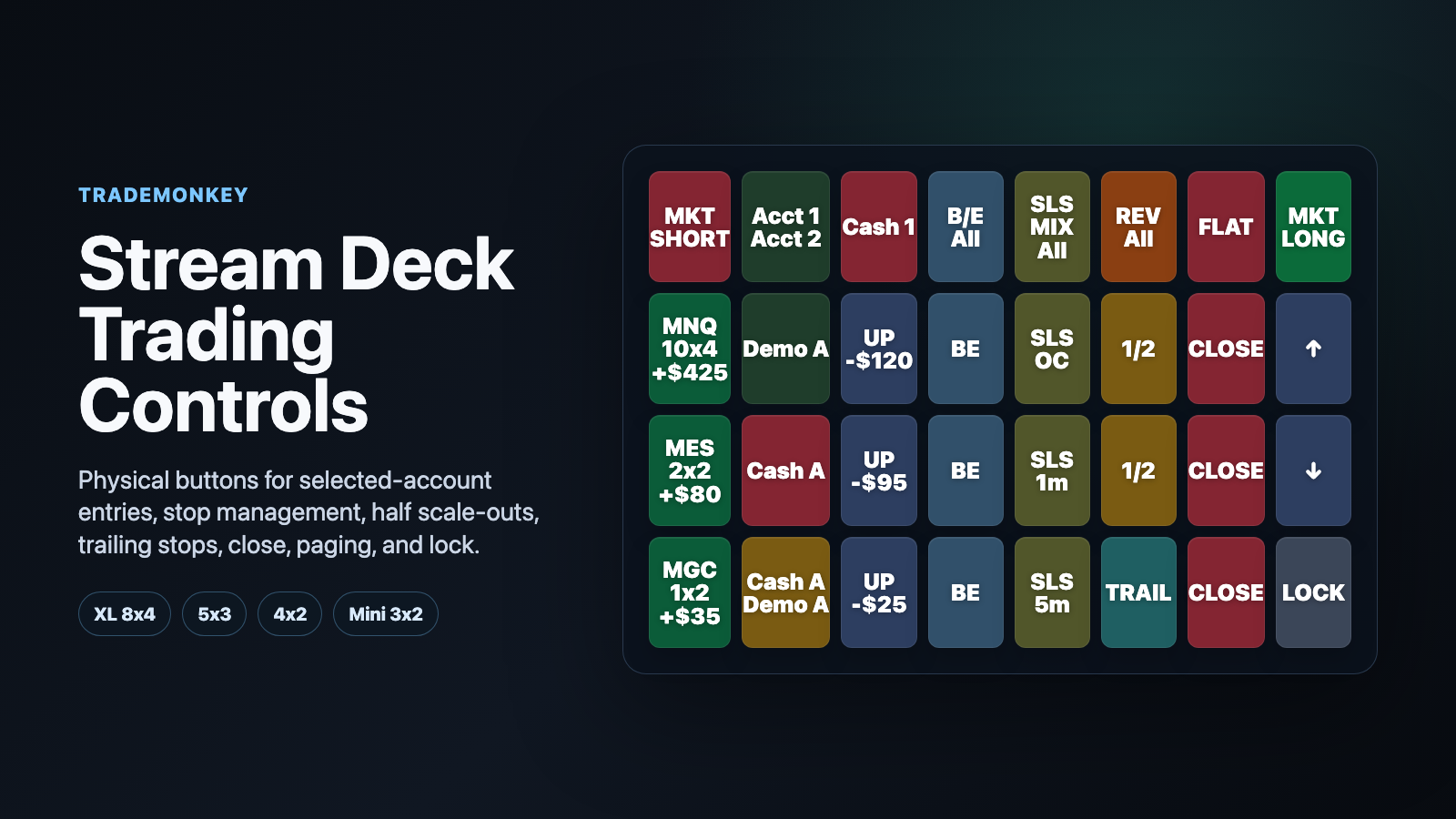
Every button is assigned by Stream Deck row and column, so the same TradeMonkey key action can fill an entire profile.
Market long and short buttons submit through the TradingPlace account selection already visible in the portal.
Max all take profits on a single tap, or tap twice within one second to flatten selected-account exposure.
Rotate the current SLS strategy across open trades or move stops to breakeven across the selected account scope.
Manage each visible open trade with breakeven, strategy rotation, 1/2 scale-out while more than one contract is open, a 2-point trailing stop once one contract remains, and close controls.
TradeMonkey uses the same account selection rules as TradingPlace. The button color shows whether a trade is scoped to demo/prop accounts, funded/cash accounts, or a mix.
The authenticated TradeMonkey wizard previews each supported layout before pairing so the physical buttons match the trading assignments.
Full layout with top-left lock, selected-account controls, SLS All, B/E All, three visible open-trade rows, paging arrows, and bottom-right market short.
Compact selected-account layout with market entry, SLS All, B/E All, reverse all, Max, account scope, and lock.
Single-row top controls for market short, REV All, MAX, and market long, plus account scope, SLS All, and lock.
Smallest supported template with market long and short, Max with double-tap flatten, account scope, and lock.
Open your TradingPlace portal account so device pairing stays scoped to the right organization.
The wizard serves the maintained TradingPlace Stream Deck plugin package and layout preview.
Enter the pairing code from Stream Deck into the portal wizard and choose the template that matches your hardware.
Confirm the layout in demo or playback, keep lock enabled until ready, then trade with the same selected-account scope as the portal.
Open the authenticated setup wizard to download the plugin, preview button assignments, pair the device, and manage linked TradeMonkey devices.
Stream Deck is a product line of Elgato. TradingPlace TradeMonkey provides Stream Deck compatible controls for TradingPlace users; this page does not imply an official Elgato partnership.